The objective of this post is to explain how to access query parameters passed in HTTP requests sent to a web server deployed in the ESP8266.
Introduction
The objective of this post is to explain how to access query parameters passed in HTTP requests sent to a web server deployed in the ESP8266.
Query parameters appear at the end of the path of the URL [1] and allow to pass additional information. The query parameters compose the query string and are separated from the path in the URL by a question mark (“?”) [1].
Each query parameter is specified in the format “ParameterName=ParameterValue”. If multiple parameters need to be passed, they should be separated with ampersands (“&”) [1].
So, an example of a URL with query parameters is shown bellow.
http://website.com/path?parameter1=value1¶meter2=value2
This can be used to pass some extra information to the ESP8266, which can be read by the handling functions of the web server.
Note that, through this tutorial, the terms query parameter and argument are used with the same meaning when referring to the values passed in the URL.
The code
The initializing part of the code is pretty much the same as we analysed in the previous post about setting a HTTP server in the ESP8266, so only a brief summary will be presented. We start by connecting to the WiFi network and then we define in which URLs our HTTP web server will be listening to incoming requests.
For each URL, we specify the handling function that will execute upon a request on that URL.
In this specific case, we will define 2 URLs. In the first one, we will be able to receive any number of query parameters with any name and value. Then, our handling function will build and return a message with them. The name of this URL will be genericArgs. Notice the capital “A”, which needs to be taken in consideration when accessing the URL, since it will be case sensitive.
The other URL will also receive any number of query parameters, but will look for a specific parameter name and output a “not found” message when it is not present.
We will analyze the handling functions for this 2 URLs later. Now, we can see bellow the full code to initialize the HTTP web server.
#include <ESP8266WiFi.h>
#include <ESP8266WebServer.h>
ESP8266WebServer server(80); //Web server object. Will be listening in port 80 (default for HTTP)
void setup() {
Serial.begin(115200);
WiFi.begin(“YourSSID”, “YourPassword”); //Connect to the WiFi network
while (WiFi.status() != WL_CONNECTED) { //Wait for connection
delay(500);
Serial.println(“Waiting to connect…”);
}
Serial.print(“IP address: “);
Serial.println(WiFi.localIP()); //Print the local IP to access the server
server.on(“/genericArgs”, handleGenericArgs); //Associate the handler function to the path
server.on(“/specificArgs”, handleSpecificArg); //Associate the handler function to the path
server.begin(); //Start the server
Serial.println(“Server listening”);
}
void loop() {
server.handleClient(); //Handling of incoming requests
}
Now we will analyse the code of the 2 handling functions for the URLs defined. Once again, the ESP8266WebServer library makes available easy to use functions to access the query parameters passed in the HTTP requests. The definition of the code of all the query parameter related functions is available here.
For the handler function that handles generic query parameters, we will first check how many of them were passed. To do so, we call the args method on the server object. This method will return the number of query parameters that were passed on the HTTP request that triggered the execution of the handling function.
String message = “Number of args received:”;
message += server.args();
Then, we will iterate by each parameter and print the name of the argument and the value.
We will use the argName method on the server object, which receives as a parameter an integer and will return the name of the argument in that position. The first query parameter is in position zero.
We will also use the arg method, which can also receive as a parameter an integer and returns the value of that parameter.
So, we build the for loop from 0 to the number of args – 1 (the first argument is in position zero) and append the name and value of the query parameter to our string.
for (int i = 0; i < server.args(); i++) {
message += “Arg nº” + (String)i + ” –> “;
message += server.argName(i) + “: “;
message += server.arg(i) + “\n”;
}
Finally, we return the message built using the send method on the server object, as we did in the previous post. We return it as “text/plan” and with a HTTP OK code.
server.send(200, “text/plain”, message);
The full code of the handling function is shown bellow.
void handleGenericArgs() { //Handler
String message = “Number of args received:”;
message += server.args(); //Get number of parameters
message += “\n”; //Add a new line
for (int i = 0; i < server.args(); i++) {
message += “Arg nº” + (String)i + ” –> “; //Include the current iteration value
message += server.argName(i) + “: “; //Get the name of the parameter
message += server.arg(i) + “\n”; //Get the value of the parameter
}
server.send(200, “text/plain”, message); //Response to the HTTP request
}
Now, we will specify the function that looks for a particular parameter name and prints its value if found. In this case, we will be looking for an argument with name “Temperature”. Once again, we need to take in consideration that the argument name is case sensitive and thus if we pass “temperature” as parameter it will not be considered.
We will again call the arg method mentioned before, but this time it will receive as input argument a string containing the name of the query parameter we want to find. If not found, the function will return an empty string (corresponding to “”). If found, the function will return the value of the query parameter.
So, in our code, we will call the arg method, look for the returning value and build the returning string accordingly, to include in the response to the request. Finally, we return the response to the HTTP with the send method, as we did in the previous handling function. The code for the whole function is shown bellow.
void handleSpecificArg() {
String message = “”;
if (server.arg(“Temperature”)== “”){ //Parameter not found
message = “Temperature Argument not found”;
}else{ //Parameter found
message = “Temperature Argument = “;
message += server.arg(“Temperature”); //Gets the value of the query parameter
}
server.send(200, “text/plain”, message); //Returns the HTTP response
}
Important: When directly copying the code from the blog, a stray error may occur when trying to compile it on Arduino. In my case, this occurs because the editor assumes the wrong type of quotes. The easiest way to fix this, given the number of existing quotes, is to do a find and replace and put the correct quotes.
Final results
Once again, we can test our HTTP web server using a web browser such as Google Chrome. The first example, illustrated in figure 1, shows what happens when we access the “/genericArgs” URL without any query parameters.
Since we sent no parameters, the output indicates that the number of args received is zero.
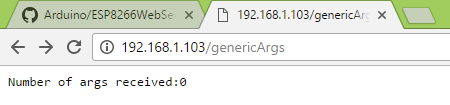
Figure 1 – Result of accessing the /genericArgs URL without query parameters.
Figure 2 shows what happens if we access the same URL but now passing query parameters. In this case, we are sending 3 parameters, which represent a date. As can be seen, the output indicates that 3 args were received and then it lists the names and values of those args.

Figure 2 – Result of accessing the /genericArgs URL with 3 query parameters.
Figure 3 shows what happens if we access the /specificArg URL with a query parameter different from what we were looking for. In this case, we sent “Luminosity” instead of “Temperature”, so the answer to the HTTP request is that the “Temperature” argument is not found.
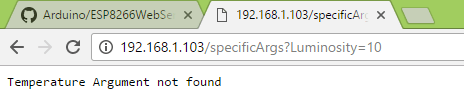
Figure 3 – Result of accessing the /specificArgs URL with the wrong query parameter.
Finally, as shown in figure 4, when we call this URL sending the correct query parameter, our handling function recognizes it and returns its value.

Figure 4 – Result of accessing the /specificArgs URL with the right query parameter.
Related posts
References
[1] http://www.ronstauffer.com/blog/understanding-a-url/
Technical details
- ESP8266 libraries: v2.3.0
 techtutorialsx
Thank you so very much, helped me a lot with understanding the library’s arguments pasing
LikeLiked by 1 person
Thanks for your feedback, I’m happy this post was useful 🙂
LikeLike
Thank you for this wonderful tutorial.. As of now i am searching on net to know this piece of information for quite long time, but i was unfortunate. but today it was a great day ahead. Thank you once again for showing the results as well(which helped me lot to understand as i am a newbie into this.)
first day i searched on net as “Forms using ESP8266”
next “sending text into esp8266 webserver”
next “server.args()” Second one was yours.. 🙂
LikeLiked by 1 person
Thank you for your feedback, it’s very important for me to know that the tutorials are being useful 🙂 I also took some time to figure how to do this on the ESP, so I decided to share in hope to help others.
Best regards,
Nuno Santos
LikeLike
very enlightening tutorials..keep up thr good work
LikeLiked by 1 person
Thank you very much 🙂
LikeLike
I’m giving myself one massive headache, and it SHOULD be a simple task…
I’m trying to integrate the following html into a re-worked ‘nodemcu-firmware-master/lua-examples/webap_toggle_pin.lua’, (toggling GPIO0 with the pull-down selection switch), BUT….. with a little twist… I have a HTML script, with a slider, and 4 simple pushbuttons, trying to control a simple robot. (the slider setting the # of seconds to move, and the 4 buttons, Fwd, Back, Left, Right)
Seconds:
1
(slider sitting at 1, and pressing the [Fwd] button the the page, responds back
http://ip.ip.ip.ip/?dur=1&d=Fwd
(dur=duration, d=Direction) when any of the direction switches are pressed.
Now, here’s the fun.. Converting the above html, to something Lua can handle, to cerate the same webpage, that will send the data… I THINK (???) I’ve figured out the method of extracting the data (using _get.dur & _get.d ), but the HTML part has me baffled!
Thanks,
LikeLiked by 1 person
GAAK! it carried the code through…
LikeLiked by 1 person
Hi! Sorry unfortunately I have never worked with LUA for the ESP, so I can’t be of much assistance.
Nonetheless, if you are using HTML, then it will render client side (your browser). So, you need to point the action of submitting the form to make a request to a HTTP route you are listening to on the LUA code.
Best regards,
Nuno Santos
LikeLike
Thank you so much for this tutorial, i have experience with micocontrolers, but i’m new to web development for IoT. I was not understanding how server.arg() get the parameters, after i read the tutorial it looks pretty easy.
LikeLiked by 1 person
Hi! You’re welcome, and thanks for your feedback 🙂
I’m glad you understood how it works. The ESP8266 webserver API is very easy to use and useful, it gives developers a lot of flexibility to do applications.
I really recommend you to keep exploring it since it will allow you to do very cool stuff.
Best regards,
Nuno Santos
LikeLike
Very useful. Thanx.
LikeLiked by 1 person
can u use post method instead of get
LikeLiked by 1 person
Hi! I’ve never tried it with post, but my guess is that it should work.
Please let us know if you test it with success, so others are aware of the possibility.
Best regards,
Nuno Santos
LikeLike
This (including all the ESP8266 posts) is the best tutorial on ESP8266, techtutorialsX is techtutorialsXtreme! thanks man, thanks a lot…
LikeLiked by 1 person
Hi! Thank you very much for the feedback, I’m glad you are enjoying the content 🙂
Best regards,
Nuno Santos
LikeLike
Never mind! I discovered the toInt() function. Awesome information by the way!
LikeLiked by 1 person
Hi! Thanks for the feedback 🙂 I’m glad you found the solution and sorry for the delay in the response, I’ve been having a lot of work these past weeks, it is being hard to catch up with the comments 🙂
Best regards,
Nuno Santos
LikeLike
Excellent
LikeLiked by 1 person
Nice tutorial, search ends here !!!
LikeLiked by 1 person
Hi!
Thank you very much for the feedback, I’m glad the post was useful 🙂
Best regards,
Nuno Santos
LikeLiked by 1 person
Extremely good tutorial, high quality and well explained. The definitive guide on this topic 😉
Thank you for sharing !!!
LikeLiked by 1 person
Hi!
Thank you very much for the feedback, I’m very happy to know that you are finding the content useful 🙂
Best regards,
Nuno Santos
LikeLike
Great blogs and very helpfull.
Is it possible to support urls like \value\12 where ’12’ can be handeled as route parameters?
Comparable to the “app.get(‘/users/:userId/books/:bookId’, function (req, res) { ” definitions on NodeJS Express routes?
LikeLiked by 1 person
Hi! Thank you very much for the feedback 🙂
Unfortunately, I’m not aware of that possibility, even though it would be very useful. If I happen to find any library that supports it, I will share here.
Best regards,
Nuno Santos
LikeLike
Não estou conseguindo achar o código completo. Alguém pode disponibilizar o mesmo ?
LikeLiked by 1 person
Boa noite,
Neste post não tenho nenhuma secção com o código completo. Na altura em que escrevi ainda não tinha o hábito de colocar o código completo no fim do artigo 🙂
No entanto, basta utilizar o primeiro bloco de código (que contem os includes de bibliotecas, o setup e o loop) e depois as duas definições das funções de handling das rotas, que se encontram no fim do artigo.
Espero que ajude 🙂
Cumprimentos,
Nuno Santos
LikeLike
Thanks so much for the simple and elegant explanation. I will make sure to cite your post and mention your in the acknowledgements section of the paper.
LikeLiked by 1 person
Hi!
Thank you very much for the feedback and for mentioning the post in your paper 🙂
May I ask what does the paper cover?
Best regards,
Nuno Santos
LikeLike
Thanks so much for a most informative and elegantly written explanation for the usage of query arguments. I will make sure to cite your post and show my gratitude for your help in the acknowledgement section of my paper.
LikeLiked by 1 person
Hello
The arg parameter is passed as a string.
How can I convert this string value into an integer value?
Thank you
LikeLike
Nice tutorial, very easy to follow.
Is there a way to handle arguments without values? For example http://name.your.color?blue&green
If I do the equivalent of ‘if (server.arg(“Temperature”)== “”)’ to test which colors have been listed I think it will return an empty string, right? So ‘if(server.arg(“blue”)==””)’ would fail?
LikeLike
Hi. I land more and more on your pages very regularly when looking for help on ESP8266 usual tasks. Nice job !
Just a word about quotes: you seem to say that the issue is with the way they are copied from browser to Arduino IDE, but I really think the issue lies in the way you created the pages, because the issue is already in your html (see this screenshot : https://www.screencast.com/t/HzMUW70126 )
I would advise you to fix your pages once and for all instead of forcing each of your readers to fix them :-). Your site would be even more friendly…
Keep on the good work !
LikeLike
Yes, I confused of theat symbols. Could you show the right one? I am newby on esp and html
LikeLike
Now my watering ESP6288 can understand universal arguments. Setting the valves, setting the timers by web request :-). Thank you for the clear tutorial :-).
LikeLike
you are genius teacher, you made everything clear in a very simple efficient way. I bookmark your website
LikeLike